

Peace of mind, Delivered
My mom lives two states away, and regulating her medication used to be so difficult. ... Now I just check the app and know. A quiet nudge if she’s running late, no guessing, no nagging. Small thing, huge relief.
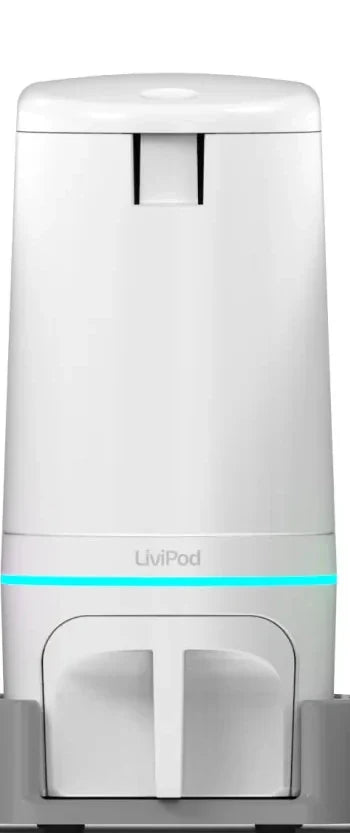
Managing pills and medications is complicated and easy to get wrong. The LiviPod™ system makes it simple, so it stops taking over your day. Load each pod once, set your schedule in the free app, and LiviPod keeps every dose ready: the right pill, at the right time, in the right amount. Each pod lights up and alerts your phone when it's time, and one tap releases the dose. No weekly sorting. No subscription. Set it up once, and it keeps running.

I manage my own pills
You want a simple system that never needs sorting.
See How It WorksI help someone else
You help a parent, partner, or client manage a daily routine, without taking over.
See Caregiver SupportI take supplements
You run a daily stack of vitamins and supplements and want it organized.
See Supplement SetupSet your schedule once in the free LiviPod app, and LiviPod keeps it running. Each pod holds one pill type, ready in exactly the amount your day calls for. When a dose is due, the pod glows and your phone sends the alert. One tap releases it. No sorting. No guessing which pill goes where. No starting over every week.
Reviews selected by LiviPods from the App Store and Amazon.
Three steps.
Then it manages your pill schedule, instead of your pills managing yours.

Get the free LiviPod app, then add each pill or supplement with its name, dose size, and schedule.


Add one pod for every pill type, then connect each one to your app in a few taps.

LiviPod tracks every dose and alerts you the moment it's ready. One tap releases it, no digging through bottles or boxes.

Expand one pod at a time as your routine grows, or add the Base Station to collect every dose in one locking drawer.

See your regimen and dose history by day, week, or month, and share it by text or email with the people you choose.

The app guides you through pre-dispensing up to 14 days of doses into a separate pill organizer, so your pods can stay home.
Buy it once
Your LiviPod system is yours to keep.
No membership and no monthly fees, ever.
Starter Set from
$293
Shop LiviPod
No Subscription
No monthly fees, ever
Free Shipping
Delivered to your door
Free Software & Updates
The app and every update
30-Day Money-Back Guarantee
Try it risk-free
Livi began as a vision to make daily medication management easier. Over years of real-world use, our original Livi dispenser has safely organized and dispensed millions of doses, giving families and caregivers a simpler, more reliable daily routine.
Every lesson from those doses, every improvement request, and every reason people wrote to thank us shaped what came next: LiviPod, a modular, connected system built for real life, not lab conditions. It brings together everything we learned about reliability, flexible schedules, clear communication, and preserving dignity, and puts it into a system that can grow from one pod to a full daily routine, for individuals and the people who support them.
Whole tablets, capsules, caplets, soft gels, and gel caps fit, including vitamin E type caplets. Each pod holds one kind of pill, and the Fit Kit matches the pod to that pill. Half or split pills, chewables, dissolvables, gummies, powders, crushed pills, liquids, and sticky or crumbly formats are not supported.
No. The system uses Wi-Fi if you have it and Bluetooth if you do not. On Bluetooth, keep your phone nearby when a dose is due; the only feature you give up is letting someone else dispense remotely for you. There is no cellular plan and no recurring cost.
Yes. Each pod holds one kind of pill, so you set a schedule for each pill and add pods as the routine grows, up to 10 on one power adapter. When you confirm in the app, multiple pods can dispense at the same scheduled time, quietly. The app also supports as-needed items, and changing a schedule takes under 15 seconds.
No. There is no subscription and no monthly fee, and the app is free. You buy the pods once and own them, and the 1-Year Limited Hardware Warranty is not tied to any ongoing payment. Your order comes with our 100% Satisfaction Guarantee: you have 30 days from the day you receive it to try it out, and returns are free.
It is for people who manage their own daily pills, family and friends who help someone else with theirs, and people with a daily supplement routine. Starter Sets begin at 3 pods, and you can add more as your routine grows, up to 10 on one power adapter.
Our Privacy Policy lists what the LiviPod app collects and how it is used. You choose who can see your routine: caregivers get access only with your approval.
Use the Fit Kit to match the pod to its pill, a one-time step that takes about 5 to 10 minutes. Then pour the pills in loose from the bottle and set your schedule in the free app, which takes under 15 seconds. There is no device programming, and no screens or buttons on the pod. You need a smartphone, because each dose is dispensed from the app.
Pods need power to release a pill, so during an outage you open the pod from the top and take your pills by hand. There is no battery backup. When power returns, your schedule and history resync.
Yes. With Travel Packs, the app guides you through pre-dispensing up to 14 days of doses into a separate pill organizer to carry with you, while your pods stay home.
Yes. You are added in the app by email or phone number, and your parent approves before you get any access. Once they do, you can see and help with their routine from anywhere. You can also dispense remotely, but only when they have granted permission and their pods are on Wi-Fi.
Set it up once, then stop worrying.
LiviPod manages your pills and doses so you don't have to.
No subscription · Free shipping · Free software & updates · 30-day money-back guarantee

100% Satisfaction Guarantee
Free Returns.
30 days to try it at home. See how it works
Enter your email and we'll add the code to your cart.
By signing up, you agree to marketing emails from LiviPods and can unsubscribe anytime. Privacy policy.
BLKFRIDAY10
Already applied to your cart. It will show at checkout. Good through Sunday, November 29.
Shop now